Infected Manhunt
One infected hunter starts the chase. Every speedrunner death creates a new hunter. Your only objective: kill the Ender Dragon before everyone is infected.
🧟 Infected Manhunt
Beat the Ender Dragon before the infection takes everyone




One player starts infected. Every runner who dies joins the hunt. Can the survivors defeat the Ender Dragon before the infection spreads to everyone — or will the infected team grow too powerful to stop?
🎬 Inspired by Sapnap's Infected Manhunt Series
Inspired by Sapnap's viral format
🧟 Infected Manhunt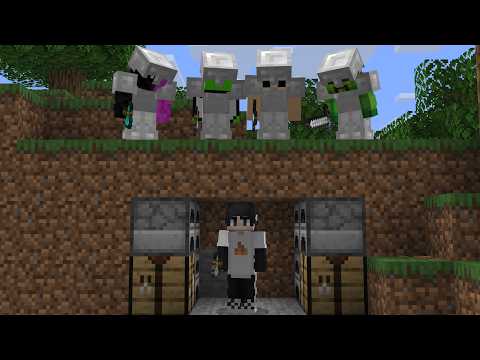
|
🧟 How It Works
The game starts with a single infected hunter. Everyone else is a runner racing to beat the Ender Dragon. The twist? Every time a runner dies, they switch sides and start hunting too. The longer the game goes, the more the infected team snowballs — making every death feel like a catastrophe for the survivors.
| Team | Goal | Win Condition |
|---|---|---|
| 🏃 Runners | Defeat the Ender Dragon | Kill the dragon before everyone is infected |
| 🧟 Infected | Infect every runner | Convert the entire lobby to their team |
✨ Features
| Feature | Description |
|---|---|
| 🧟 Infection on Death | Runners who die instantly switch to the infected team and begin hunting |
| 📈 Snowballing Gameplay | Every death grows the infected team, making late-game incredibly intense |
| 🧭 Compass Tracking | Infected players always have a compass pointing at active runners |
| 🎯 Target Picker GUI | Infected can choose exactly which runner to track via an in-game menu |
| 🖥️ Full Admin GUI | Manage games, teams, settings, and tracking without touching any files |
| 🔁 Live Team Management | Move players between teams mid-match from the GUI or a single command |
| 🔌 Disconnect-Safe State | Leaving and rejoining never corrupts a player's team assignment |
| ⚙️ Configurable Respawns | Choose between vanilla, world spawn, or a fixed custom location for infected players |
| 🎨 Custom Team Colors | Set your own colors and chat prefixes for each team |
🚀 Quick Start
| Step | Action | Details |
|---|---|---|
| 1 | 📥 Download | Get infectedmanhunt-*.jar from releases or build from source |
| 2 | 📁 Install | Place the jar in your server's plugins/ folder |
| 3 | 🔄 Restart | Start or restart the server to generate configs |
| 4 | ⚙️ Configure | Edit plugins/InfectedManhunt/config.yml if needed |
| 5 | 🎮 Play! | Run /infected gui in-game and start your first match |
Requirements
- Minecraft 1.21+
- Paper, Purpur, Spigot, or Bukkit (Paper or Purpur recommended)
🖥️ Admin GUI
The GUI is the primary control surface — most server owners will never need to memorize a command. Open it any time with /infected gui.
📋 Click to see all GUI menus
🏠 Main Menu
- Start a match with a random infected player
- Start a match by selecting the first infected manually
- Stop and fully reset the current match
- View live match status
- Open tracking, respawn, and team settings
- Reload config without restarting
🧭 Tracking Settings
- Adjust compass update speed
- Set the cooldown on last-known location messages
- Toggle last-known tracking messages on or off
💀 Respawn Settings
- Set infected respawn mode:
vanilla,world_spawn, orfixed - Save your current location as the fixed respawn point
🎨 Team Settings
- Change runner and infected team colors
- Edit runner and infected chat prefixes
- Open the live Team Management screen
👥 Team Management (Live)
- Left-click a player → make them a runner
- Right-click a player → make them infected
- Shift-click → toggle their team
Designed for mid-match corrections and moderation — no need to stop and restart the game.
📝 Commands
Admin Commands
| Command | Description |
|---|---|
/infected gui | Opens the full admin GUI |
/infected start <player> | Start a game with a specific infected player |
/infected start random | Start a game with a randomly selected infected player |
/infected stop | Stop and fully reset the current game |
/infected team <player> <runner|infected> | Move a player to a specific team during an active match |
/infected reload | Reload config.yml without restarting |
General Commands
| Command | Description |
|---|---|
/infected status | Display current game state and team counts |
/infected track | Open the target picker if you are infected |
🔐 Permissions
| Permission | Access |
|---|---|
infectedmanhunt.admin | Full control — GUI, start/stop, reload, team management |
infectedmanhunt.command | Base command access for general players |
🧭 Compass Rules
- Only infected players carry the tracking compass
- Right-click → cycle between available runners
- Sneak + right-click → open the target picker GUI
- If a runner is in another dimension, the compass falls back to their last-known location
- Runners cannot pick up, craft, or hold a hunter compass during a match
⚙️ Configuration
All settings live in plugins/InfectedManhunt/config.yml and can be adjusted from the GUI.
📄 Click to see all config options
🚦 Start Settings
| Key | Description |
|---|---|
start.teleport_to_spawn | Teleport all players to spawn when a match begins |
start.announce_titles | Show title messages on game start and when players become infected |
💀 Respawn Settings
| Key | Description |
|---|---|
respawn.mode | vanilla, world_spawn, or fixed |
respawn.world | World name used for fixed respawn mode |
respawn.x / respawn.y / respawn.z | Coordinates for fixed respawn mode |
🧭 Tracking Settings
| Key | Description |
|---|---|
tracking.update_ticks | How often the compass updates its target position |
tracking.message_cooldown_seconds | Cooldown between last-known location messages |
tracking.notify_last_known | Enable or disable last-known location messages entirely |
🎨 Team Settings
| Key | Description |
|---|---|
teams.speedrunner_color | Scoreboard/chat color for the runner team |
teams.infected_color | Scoreboard/chat color for the infected team |
teams.speedrunner_prefix | Chat prefix displayed for runners |
teams.infected_prefix | Chat prefix displayed for infected players |
🔨 Building From Source
mvn package
Output: target/infectedmanhunt-1.0.2.jar
📋 Notes for Server Owners
- The plugin is designed around vanilla-feeling gameplay with minimal visual clutter.
- The GUI is the primary control surface — most server owners will never need to memorize commands.
- Live team management lets admins correct player state during an active match without resetting anything.
- Disconnect-safe state means players who crash or leave won't corrupt the ongoing game.
🙌 Credits & Support
Inspired by Sapnap's iconic Infected Manhunt format
Developed by muj4b

🎉 Experience the Infection Today! 🎉
Snowballing gameplay • Compass tracking • Full GUI control • Endless chaos
Found a bug or have a suggestion? Report it on our Discord!