
Swampy Villages
Add the Swampy Villages can be found in Swamp Biomes with custom loot tables and new advancements, compatibility for 1.20 to 1.21.11
Swampy Villages 🌿
This DataPack adds Swampy Villages to Minecraft, bringing a better environment to the vanilla game especially to this swamps biomes 

LuisterCorp © - 2025
Notas📝 (Notes)
- Swampy Villages is compatible with versions 1.20 to 1.21.11🏷️
- Swampy Villages adds new (structure) to world generation🌐
- Swampy Villages is compatible with any generation Datapack in the World
- No it is necessary to unzip the downloaded file 🗂️
- Use Headphones for a better experience 🎧
Descripción 🎼 (Description)
Have fun in a more immersive experience to the vanilla Minecraft game, adding a new jigsaw structure to the swamp biomes , bringing a unique and diverse feature to the Overworld🌎

With this Datapack, exploration 🧭 becomes more exciting, bringing a unique structure to the Badlands
Generation🌐 (Generacion)
The Swampy Villages, as its name says, is generated in the Swamp Biomes, if you want to locate it by commands use:
/locate structure minecraft:village_swampy
Nuevos Logros 🏆 (New Advancements)
If you find structure, you will receive a new advancements called “Very Swampy Village...” and it will appear as follows:
◾ Imagen (Image) :

Disclaimer Regarding Included Structures
Disclaimer Regarding Included Structures
The structures included in this Datapack and/or Mod were originally obtained from a public video tutorial published on YouTube. These structures were later modified, decorated, and transformed to be integrated as part of this project.
At the time this project was initially published, the original creator of the tutorial did not have an explicit license restricting the use, modification, or redistribution of the structures shown in the video. Therefore, no prior authorization was requested.
Subsequently, on October 28, 2025, the original creator introduced a license that prohibits the use of their structures obtained through their Buy Me a Coffee page. However, this license does not apply to the structures used in this project, as they do not originate from that source, but exclusively from the publicly available tutorial linked below:
This project does not claim ownership of the original structures presented in the tutorial. Full credit is given to the original creator, and authorship is claimed only over the modifications and adaptations made.
Original Creator Credits & Social Links
-
Buy Me a Coffee: https://buymeacoffee.com/enchantedarchitecture
-
YouTube Channel: https://www.youtube.com/@EnchantedArchitecture/videos
Procesos de Instalación 💾 (Installation Processes)
 Below we invite you to review the correct installation process of our Data Package in the following categories
Singleplayer - Un Jugador
Pasos Para Instalar DataPack (Steps to Install DataPack):
-
Abrir Minecraft (Open Minecraft)
Inicia el juego (start the game). -
Crea un Nuevo Mundo (Create a New World)
Vaya a "Más" y haga clic en "Paquetes de Datos". (go to “More” and click on "Datapacks”).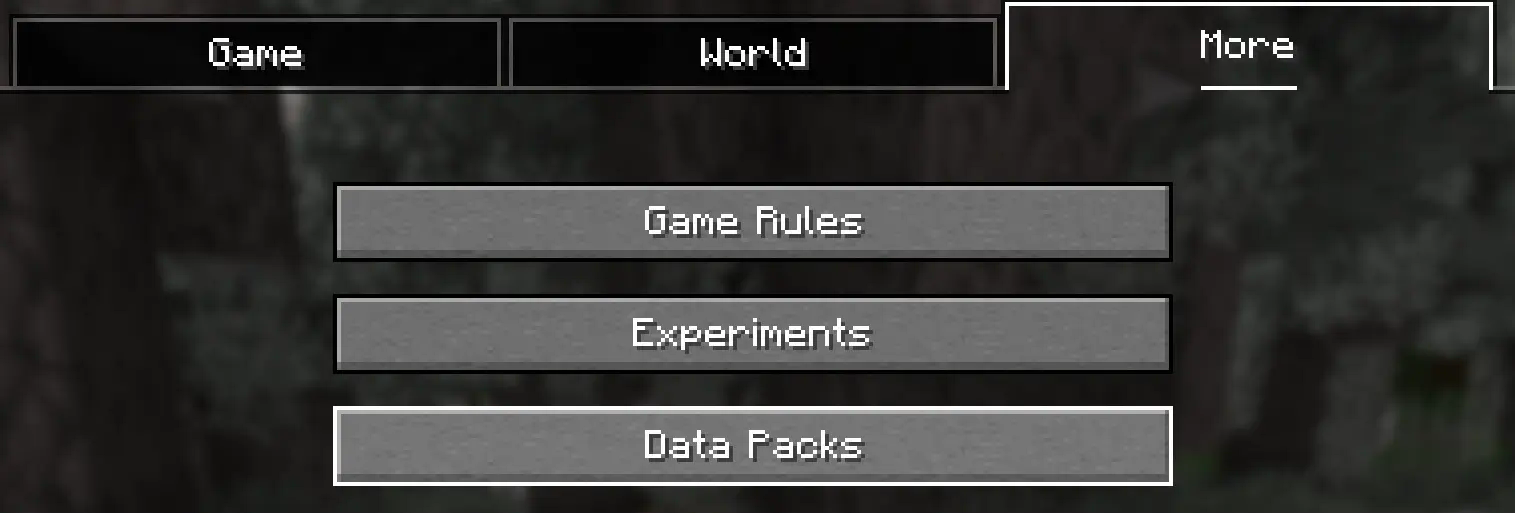
-
Añadir el Datapack (Add Datapack)
Arrastre el Paquete de Datos (un archivo.zipo directorio) a la ventana de Minecraft.📟 (Drag the Data Package (a
.zipor directory) to the Minecraft window).
Aparecerá una pantalla de confirmación. Haga clic en "Confirmar".
📟 (A confirmation screen will appear. Click on "Confirm ”).

-
Activar el DataPack (Activate the DataPack)
Mueva el Paquete de Datos al lado derecho de la pantalla haciendo clic en el triángulo de su ícono (visible al pasar el cursor sobre él).📟 Move the Datapack to the right side of the screen by clicking on its triangle icon (visible when hovering over it).

-
Creación del Mundo Nuevo (Creation of the New World)
Haz clic en "Hecho" en la parte inferior de la pantalla.📟 (Click "Done ” at the bottom of the screen).
 Continúa creando tu mundo y haz clic en "Crear nuevo mundo".
📟 (Continue creating your world and click on "Create new world ”).
⚠️ IMPORTANTE - IMPORTANT⚠️
Se generará un aviso al momento de crear un mundo nuevo, ya que son características experimentales, cualquier tipo de error puede ser comunicado a nuestro Discord Oficial
📟 A warning will be generated when creating a new world, since these are experimental features, any kind of error can be communicated to our Discord Oficial
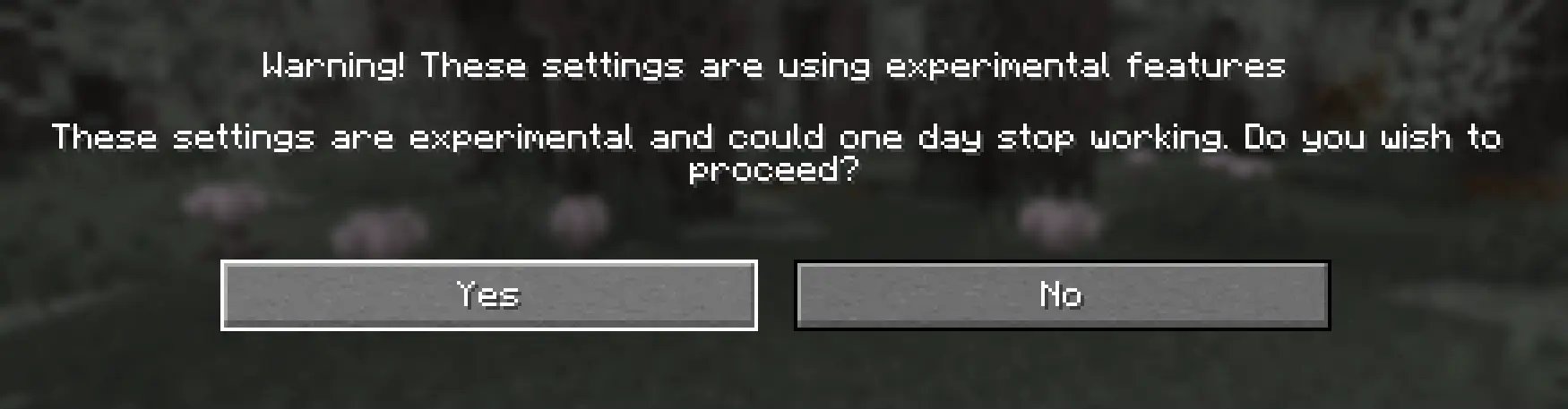
Continue dandole al boton Sí y disfrute de su Aventura :)
📟 Continue clicking the Yes button and enjoy your adventure :)
Multiplayer - Multijugador
Pasos Para Instalar DataPack (Steps to Install DataPack):
-
Abrir la carpeta de tu servidor (Open the folder on your server)
Navega hasta la carpeta de tu servidor y luego abre la carpeta del mundo en el que deseas instalar el Paquete de Datos (predeterminado:world).Navigate to your server folder and then open the world folder in which you want to install the Datapacks (default:
world). -
Agrega el DataPack (Add the DataPack)
El Paquete de Datos debe ser un archivo.zip.file.
Coloca el Paquete de Datos en una carpeta llamadadatapacksdentro de la carpeta world.The DataPack must be a
.zipfile.
Place the DataPack in a folder nameddatapacksinside the world folder. -
Vuelve a cargar el servidor (reload the server)
Escribe/reloaddesde la consola o como operador de nivel 3, si el servidor estaba ejecutándose durante la instalación.Type
/reloadfrom the console or as a level 3 operator, if the server was running during installation.
⚠️ IMPORTANTE - IMPORTANT⚠️
Se generará un aviso al momento de crear un mundo nuevo, ya que son características experimentales, cualquier tipo de error puede ser comunicado a nuestro Discord Oficial
📟 A warning will be generated when creating a new world, since these are experimental features, any kind of error can be communicated to our Discord Oficial
LuisterCorp Projects:
 <img src="https://i.ibb.co/fY5TL11S/Logos-Earthblade-1.png" alt="Logos-Earthblade-1" border="0"> <img src="https://i.ibb.co/xtrv5BGY/Ender-Cat-Logo.jpg" alt="Ender-Cat-Logo" border="0">
  <img src="https://i.ibb.co/MDdbdrdS/Logo-Monasterio-Cherry.png" alt="Logo-Monasterio-Cherry" border="0"> <img src="https://i.ibb.co/gZnNGjS6/Ice-Pillager-Castle.jpg" alt="Ice-Pillager-Castle" border="0">
  <img src="https://i.ibb.co/JWVXQ8Lr/Mangrove-Mansion-Logo-Nuevo.jpg" alt="Mangrove Mansion Logo Nuevo" border="0"> <img src="https://i.ibb.co/MxVmqjdN/Bamboo-Temple-Logo.jpg" alt="Bamboo-Temple-Logo" border="0"> <img src="https://i.ibb.co/p6H5SRW6/Badland-Temple-logo.png" alt="Badland-Temple-logo" border="0">
  <img src="https://i.ibb.co/HpHXcJxF/Badland-Village-Logo.png" alt="Badland-Village-Logo" border="0">


 <img src="https://i.ibb.co/LzyRzgXY/Cooper-Golem-Logo.gif" alt="Cooper-Golem-Logo" border="0">
  <img src="https://i.ibb.co/1GzNL8Kp/Happy-Logo.png" alt="Happy-Logo" border="0"> <img src="https://i.ibb.co/7t9CZngk/Logo-Savanna.png" alt="Logo-Savanna" border="0"> <img src="https://i.ibb.co/vCK4q4mZ/Fallen-Logs-Logos-1-1.png" alt="Fallen-Logs-Logos-1-1" border="0"> <img src="https://i.ibb.co/k6xCpvW0/Warped-Fallen-Fungus.png" alt="Warped-Fallen-Fungus" border="0">
  <img src="https://i.ibb.co/Y4Pg3T88/Water-Well-s-Update-PNG.png" alt="Water-Well-s-Update-PNG" border="0">

Advancements Projects:
<img src="https://i.ibb.co/dSr68WJ/Wood-Advancements-Logo.jpg" alt="Wood-Advancements-Logo" border="0"> <img src="https://i.ibb.co/5hHHc5Pc/ezgif-com-resize-6.gif" alt="ezgif-com-resize-6" border="0"> 

Towerinator Projects:


 <img src="https://i.ibb.co/6c4WW2PC/Abandoned-Ruined-Tower-Logo.jpg" alt="Abandoned-Ruined-Tower-Logo" border="0"> <img src="https://i.ibb.co/hxWZ9Xzv/Sandstone-Tower-Logo.jpg" alt="Sandstone-Tower-Logo" border="0">


Sponsored by 💌

