



SecureCommands is a plugin that allows you to easily add more security to your server by focusing on the most vulnerable commands that can cause the most damage if used by an unauthorized user.
You can support the plugin by making a donation through this link: https://paypal.me/PabloHernandez601

📤 Installation Guide
This plugin is compatible from version 1.18x to 1.21x.
Download the latest version of the plugin and upload it to your server's plugins folder.
Once uploaded, restart the server for the changes to take effect.
✅ Features:
- Block vulnerable commands using individual codes for user and user whitelisting.
- Discord Webhook Integration
- Database Connection (Required)
- Automatic detection of users who have OP but have not been added to the Plugin Whitelist.
- Automatic Premium User Detection. Cracked users are now prevented from accessing the server if they have previously logged in as Premium.
- Added new PlugmanBlocker module, you cannot use Plugman commands with this plugin.
⌨️ Commands:
- /sc setcode
- /sc resetcode
- /sc reload
- /sc resetall
- /sc add
- /sc remove
- /sc addcommand
- /sc removecommand
- /sc premium
- /sclogin
⁉️ FAQ:
Connect your Plugin with a Discord Webhook
Send plugin updates and security notifications to your Discord with the Discord Webhook config.
I forgot the set code what do I do?
To reset the code you must execute the /sc resetcode command from the server console, once done the /sc setcode command will be enabled again.
I want to reset the code for all users, how can I do it?
To do this you just need to run the /sc resetall command from the server console.
📸 Screenshots
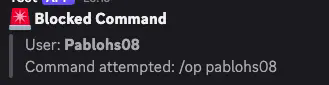
Discord Webhook Integration: You will receive notifications when a user performs a command without being logged in with the pre-defined code.
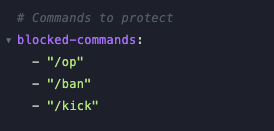
Command Blocker: You can lock the commands you need so that unauthorized users cannot use them.
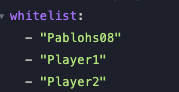
Whitelisted Users: You can add users to the whitelist. If a user guesses the code but isn't on this list, they won't be able to use the corresponding command.
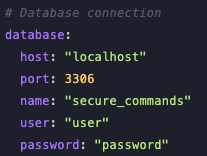
Database Connection (Required): This plugin requires connection to a database as the encrypted code you set will be stored there.
SpigotMC:
https://www.spigotmc.org/resources/securecommands-1-18x-1-21x.128091/
