
3.8K
6
Passwords
Secure your server with Passords!
Passwords an easy to use and simple plugin to secure your minecraft server from strangers. If you dont want to use a whitlis you can simply give your friends the password and thats it.
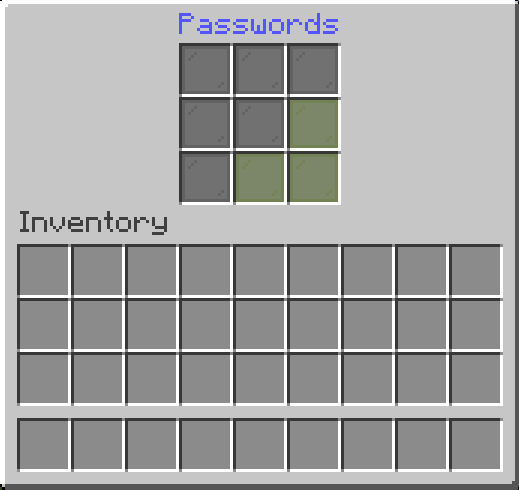
Features
-
Custom Passwords for Each Player
Allow players to create unique passwords, ensuring personalized and secure access to their accounts. -
Admin Password Options
Admins can set a master password for full permissions and Op status. -
Seamless Integration
Works effortlessly with any Minecraft server without requiring complex setup.
Sample Config.yml
Below is an example configuration file to get you started:
Click to view config.yml
version: "2.6.2"
debug: false
# Password dose not supports PlaceholderAPI in messages.
# Supported placeholders are: &player& -> Player Name
# Placeholders are only supported in messages

settings:
  # check-type: server : One password for the entire server.
  # check-type: player : A unique password for each player. (Works only on the first join. To reset, delete player data or use the /setpassword command)
  # check-type: none   : No password check.
  # check-type: pattern : The player must enter a pattern like "o x o"
  #                                                            "x x x"
  #                                                            "x x x"
  check-type: server
  # GUI Name
  gui-name: Enter Passwords
  # Set password name
  set-password-name: Set Password
  # Message that will be displayed as the kick reason.
  fail-message: The password is incorrect!
  # When the UI is closed without a password
  close-ui-message: You need to enter a password!
  # Enable welcome message.
  welcome-message-enabled: true
  # Welcome message after login.
  welcome-message: Welcome to ExampleServer
  # Welcome message second line (Only for title)
  welcome-message-second: Passwords
  # Display type for the welcome message: message; actionbar; title
  welcome-message-display-type: message
  # Enable login gamemode.
  login-gamemode-enabled: true
  # Gamemode every player will have upon login: survival, creative, adventure, spectator
  login-gamemode: survival
  # Player password length (for the check-type: player)
  player-password-length: 4
  # Blocked passwords ( only for the check-type: player & server )
  blocked-passwords:
    - 1111
  # Saves the player inventory on logout and restores it on login. ( !!!!! Waring: When the data folder or the player data in the passwords folder is deleted, the player inventory will be lost !!!!! )
  save-player-inventory: false
  # Saves the player inventory automatically
  enable-auto-save: true
  # Saves the player inventory every 5 minutes (if save-player-inventory is true)
  save-player-inventory-intervall: 10 # in minutes ( min 3 )
  # Invulnerable on login (note: this will prevent fall damage when exploited)
  invulnerable-on-login: true

server:
  # Server password (the password can be any length | for the check-type: server)
  password: 1234
  # Staff password (the password can be any length | for the check-type: server)
  staff-password: 8181
  # Staff permissions (will be given to the player after login)
  staff-permissions:
    - passwords.*
  # Remove staff permissions on logout
  remove-staff-permissions-on-logout: true
  # Password pattern (for the check-type: pattern)
  pattern:
    - oxo
    - xxx
    - xxx
Commands
Click to view commands
/setpassword <Password>→ Set your password./setplayerpassword <Player> <Password>→ Ser a Player's password./logout <Player>→ Logout player.
For Developers: Maven/Gradle Setup
Click to view Maven/Gradle setup
Maven:
<dependency>
    <groupId>cho.info</groupId>
    <artifactId>passwords</artifactId>
    <version>(Plugin version)</version>
</dependency>

<repositories>
    <repository>
        <id>local-repo</id>
        <url>file:/path/to/my-local-repo</url>
    </repository>
</repositories>
Gradle:
implementation files("$projectDir/lib/passwords-(Plugin version).jar")
Совместимость
Создатели

Детали
Лицензия:MIT
Опубликован:1 год назад
Обновлён:3 месяца назад