
OutCombatLog
✨ Anti-PvP leave, Item CD, Punishments. BossBar, sounds, chat messages, and more!
⚔️ OutCombatLog — Ultimate Combat Logging Prevention System
The most advanced combat logging prevention plugin for Minecraft. Beautiful BossBar timers, item cooldowns, command blocking, and complete customization for your server's PvP experience.












⚔️ About OutCombatLog
OutCombatLog is not just another combat logger — it's a complete combat logging prevention system for your Minecraft server. Unlike standard plugins that simply punish players, OutCombatLog delivers a professional experience with beautiful BossBar timers, stunning visual feedback, and unparalleled customization options.
Whether you're running a small PvP server with friends or a large factions network with hundreds of players, OutCombatLog adapts to your needs with its flexible configuration system, item cooldowns, and comprehensive combat protection.
✨ Feature Showcase
⚔️ Core PvP Features
| Feature | Description |
|---|---|
| PvP Timer | Configurable duration (default: 30 seconds) that resets with each hit |
| BossBar Display | Beautiful BossBar on top with real-time timer and custom text |
| Combat on Death | Configurable - killer remains in PvP after kill to prevent instant logout |
| Logout Punishment | Players who log out during PvP are killed with item drops like normal death |
| Login Notification | Players are notified when they log in if they left during PvP |
🛡️ Protection & Safety
| Feature | Description |
|---|---|
| Command Blocking | Block all commands during PvP except allowed ones (msg, tell, help, etc.) |
| Ender Chest Block | Prevent players from opening Ender Chests during combat |
| Logout Broadcast | Alert players in radius (configurable) when someone combat logs |
| Item Cooldowns | Custom cooldowns for specific items during PvP only |
⏱️ Item Cooldowns (EXAMPLE)
| Item | Default Cooldown |
|---|---|
| ENDER_PEARL | 15 seconds |
| ENCHANTED_GOLDEN_APPLE | 60 seconds |
| GOLDEN_APPLE | 30 seconds |
| CHORUS_FRUIT | 10 seconds |
| FIREWORK_ROCKET | 10 seconds |
| ENDER_CHEST | 30 seconds |
Note: All cooldowns are fully configurable and only apply during PvP mode!
🔊 Audio & Visual
| Feature | Description |
|---|---|
| Combat Start Sound | Configurable sound when entering PvP |
| Combat Tick Sound | Ticking sound 3 seconds before PvP ends |
| Combat End Sound | Victory sound when PvP timer expires |
| BossBar Customization | Full RGB color support, custom text, and timer display |
| BossBar Styles | Multiple styles: PROGRESS, NOTCHED_6, NOTCHED_10, NOTCHED_12, NOTCHED_20 |
👑 Admin Features
| Feature | Description |
|---|---|
| Config Reload | /ocl reload - Reload configuration without restart |
| Item List | /ocl list - View all items with cooldowns |
| Combat Status | /ocl check - Check current PvP status |
| Plugin Info | /ocl info - View plugin information and statistics |
| Update Checker | Automatic notification when new version is available |
📥 Installation Guide
| Step | Action |
|---|---|
| 1️⃣ | Download — Get the latest .jar from Modrinth |
| 2️⃣ | Install — Place the JAR into your server's plugins/ folder |
| 3️⃣ | Restart — Restart your server (or use /reload if you must) |
| 4️⃣ | Configure — Edit plugins/OutCombatLog/config.yml to your liking |
| 5️⃣ | Enjoy! — Players are now protected from combat loggers |
⚠️ Important: A full server restart is strongly recommended over
/reloadfor optimal performance and to avoid any plugin conflicts.
📊 bStats Metrics
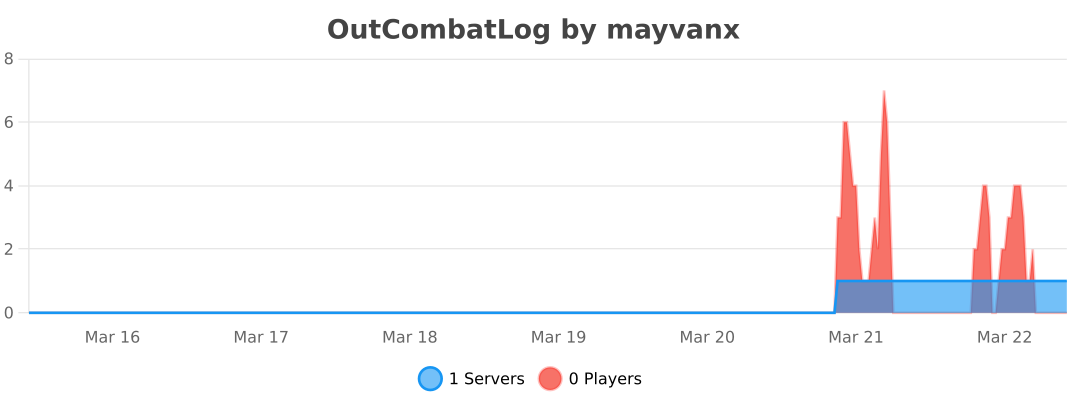
OutCombatLog uses bStats to collect anonymous usage statistics. This helps us improve the plugin based on real usage data. Below is the live statistics chart for OutCombatLog:
🎮 Commands & Permissions
👤 Player Commands
| Command | Description | Permission | Default |
|---|---|---|---|
/ocl | Main plugin command | outcombatlog.use | ✅ All players |
/ocl list | List all items with cooldowns | outcombatlog.use | ✅ All players |
/ocl check | Check current PvP status | outcombatlog.use | ✅ All players |
/outcombatlog | Alias for main command | outcombatlog.use | ✅ All players |
/combatlog | Alias for main command | outcombatlog.use | ✅ All players |
/cl | Alias for main command | outcombatlog.use | ✅ All players |
/pvp | Alias for main command | outcombatlog.use | ✅ All players |
👑 Admin Commands
| Command | Description | Permission | Default |
|---|---|---|---|
/ocl reload | Reload plugin configuration | outcombatlog.admin | ❌ Ops only |
/ocl info | View detailed plugin information | outcombatlog.admin | ❌ Ops only |
🔑 Permissions
| Permission | Description | Default |
|---|---|---|
outcombatlog.use | Use basic plugin commands | ✅ All players |
outcombatlog.admin | Admin commands (reload, info) | ❌ Ops only |
outcombatlog.bypass | Bypass all combat restrictions | ❌ Ops only |
⚙️ Configuration Deep Dive
📁 Core Configuration
prefix: "&f[&x&E&5&4&1&E&7ᴄ&x&D&B&3&9&D&Eᴏ&x&D&1&3&1&D&5ᴍ&x&C&7&2&9&C&Cʙ&x&B&D&2&1&C&3ᴀ&x&B&3&1&8&B&Aᴛ&x&A&9&1&0&B&1ʟ&x&9&F&0&8&A&8ᴏ&x&9&5&0&0&9&Fɢ&f]"

# PvP tag duration (in seconds)
pvp-time: 30

# Death mode in PvP
# true:  Victim exits PvP, BUT killer remains in PvP
# false: Both players exit PvP
combat-on-death: true

# Logout broadcast radius (in blocks)
# 0 = disable broadcasting
logout-broadcast-radius: 25

# Commands allowed during PvP
allowed-commands:
  - msg
  - tell
  - w
  - r
  - reply
  - whisper
  - report
  - help
  - discord
  - donate
  - sites
  - combatlog
  - outcombatlog
  - ocl
  - pvp

# List of all materials: https://hub.spigotmc.org/javadocs/spigot/org/bukkit/Material.html
item-cooldowns:
  ENDER_PEARL: 15
  ENCHANTED_GOLDEN_APPLE: 60
  GOLDEN_APPLE: 30
  CHORUS_FRUIT: 10
  FIREWORK_ROCKET: 10
  ENDER_CHEST: 30

bossbar:
  # Enable/disable bossbar
  enabled: true

  # Bossbar color
  # Available colors: BLUE, GREEN, PINK, PURPLE, RED, WHITE, YELLOW
  color: "RED"

  # Bossbar style
  # Available styles:
  # • PROGRESS      - solid bar
  # • NOTCHED_6     - divided into 6 parts
  # • NOTCHED_10    - divided into 10 parts
  # • NOTCHED_12    - divided into 12 parts
  # • NOTCHED_20    - divided into 20 parts
  overlay: "PROGRESS"
  text: "&5⚔ &x&E&5&4&1&E&7ᴄ&x&D&B&3&9&D&Eᴏ&x&D&1&3&1&D&5ᴍ&x&C&7&2&9&C&Cʙ&x&B&D&2&1&C&3ᴀ&x&B&3&1&8&B&Aᴛ&x&A&9&1&0&B&1ʟ&x&9&F&0&8&A&8ᴏ&x&9&5&0&0&9&Fɢ &5⚔"

  # Show remaining time in text
  # true  - %seconds% will be replaced with the number (15, 5)
  # false - %seconds% will be removed or left as is
  show-time: true

sounds:
  # Enable/disable all sounds
  enabled: true

  # Sound when entering PvP
  combat-start: "BLOCK_BELL_USE"

  # Ticking sound before PvP ends
  combat-tick: "BLOCK_NOTE_BLOCK_HAT"

  # Sound when PvP ends
  combat-end: "ENTITY_PLAYER_LEVELUP"

messages-enabled:
  logout-punishment: true
  logout-return-message: true
  command-blocked: true
  combat-status: true
  not-in-combat: true
  config-reloaded: true
  no-permission: true
  enderchest-blocked: true
  combat-ended: true
  item-cooldown: true
  plugin-info: true
  cooldowns-list: true

messages:
  # When player logs out during PvP
  logout-punishment: "&e%player% &cʟᴇꜰᴛ ᴛʜᴇ ꜱᴇʀᴠᴇʀ ᴅᴜʀɪɴɢ ᴘᴠᴘ!"

  # When returning after logout punishment
  logout-return-message: "&cʏᴏᴜ ʟᴇꜰᴛ ᴅᴜʀɪɴɢ ᴘᴠᴘ ᴀɴᴅ ᴡᴇʀᴇ ᴀᴜᴛᴏᴍᴀᴛɪᴄᴀʟʟʏ ᴋɪʟʟᴇᴅ..."

  # Command blocked during PvP
  command-blocked: "&c❌ ᴄᴀɴɴᴏᴛ ᴜꜱᴇ ᴄᴏᴍᴍᴀɴᴅꜱ ᴅᴜʀɪɴɢ ᴄᴏᴍʙᴀᴛ!"

  # Combat status check
  combat-status: "&6⚔ ᴘᴠᴘ ꜱᴛᴀᴛᴜꜱ:\n &7└ ᴛɪᴍᴇ ʟᴇꜰᴛ: &e%time% ꜱᴇᴄ\n &7└ ᴏᴘᴘᴏɴᴇɴᴛ: &c%opponent%"

  # Not in combat
  not-in-combat: "&a✓ ʏᴏᴜ ᴀʀᴇ ɴᴏᴛ ɪɴ ᴘᴠᴘ ᴍᴏᴅᴇ"

  # Config reloaded
  config-reloaded: "&a✓ ᴄᴏɴꜰɪɢᴜʀᴀᴛɪᴏɴ ʀᴇʟᴏᴀᴅᴇᴅ"

  # No permission
  no-permission: "&cɴᴏ ᴘᴇʀᴍɪꜱꜱɪᴏɴ"

  # Ender chest blocked
  enderchest-blocked: "&c❌ ᴄᴀɴɴᴏᴛ ᴏᴘᴇɴ ᴇɴᴅᴇʀ ᴄʜᴇꜱᴛ ᴅᴜʀɪɴɢ ᴄᴏᴍʙᴀᴛ!"

  # Combat ended
  combat-ended: "&a✓ ᴘᴠᴘ ᴍᴏᴅᴇ ᴇɴᴅᴇᴅ"

  # Item on cooldown
  item-cooldown: "&c❌ ɪᴛᴇᴍ ᴏɴ ᴄᴏᴏʟᴅᴏᴡɴ: &e%.1f &cꜱᴇᴄ"

  # Plugin info
  plugin-info: "&fᴘʟᴜɢɪɴ ɪɴꜰᴏ:\n&7└ &fᴠᴇʀꜱɪᴏɴ: &e2.3\n&7└ &fᴀᴜᴛʜᴏʀ: &evɪꜱꜱᴇᴅ ꜱᴛᴜᴅɪᴏ\n&7└ &fᴘᴠᴘ ᴛɪᴍᴇ: &e%pvptime% ꜱᴇᴄ\n&7└ &fᴅᴇᴀᴛʜ ᴍᴏᴅᴇ: &e%deathmode%\n&7└ &fɪᴛᴇᴍꜱ: &e%itemscount%"

  # Cooldowns list header
  cooldowns-list: "&fɪᴛᴇᴍꜱ ᴡɪᴛʜ ᴄᴏᴏʟᴅᴏᴡɴꜱ:\n%items%"

  # Cooldown item format
  cooldowns-item-format: "&7└ &f%material%: &e%cooldown% ꜱᴇᴄ"

check-updates: true
