
Ollama Chat
A versatile Minecraft plugin that integrates Ollama and OpenAI-class APIs, providing multi-language support, real-time AI interactions, and advanced prompt and conversation management for immersive in-game experiences.
OllamaChat
Overview
OllamaChat is a cutting-edge Minecraft plugin that integrates Ollama and OpenAI-class APIs, enabling real-time AI interactions, multi-language support, and advanced prompt and conversation management for immersive in-game experiences.
Example
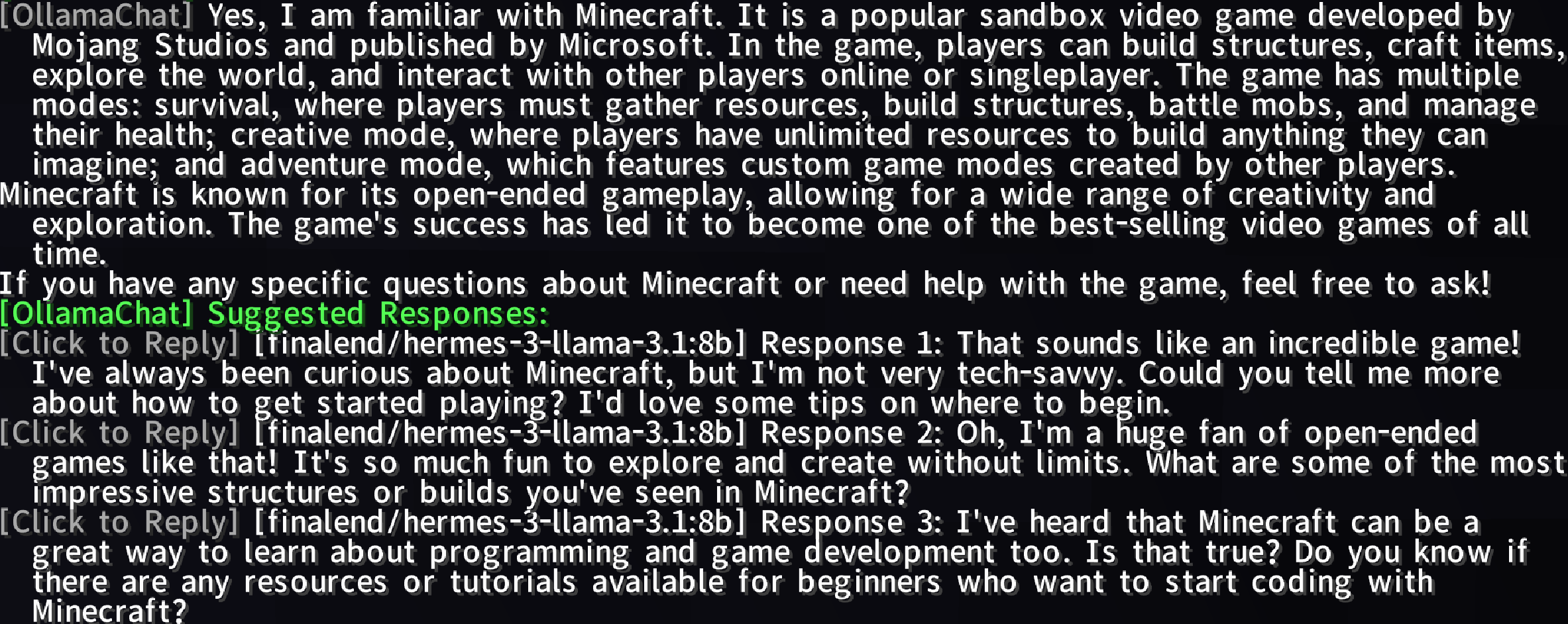
Features
- AI-Powered Conversations: Chat with AI using
@botor@aiprefixes for dynamic, intelligent responses. - Ollama & OpenAI Integration: Leverage advanced AI models to enhance your Minecraft experience.
- Multi-Language Support: Supports multiple languages (e.g., English, Simplified Chinese) via
langfolder files. - Toggle AI Services: Enable/disable AI services with
/ollamachat toggle <ai-name>. - Prompt Management: Create, delete, list, select, or clear custom prompts to tailor AI interactions.
- Conversation Management: Start, switch, delete, or view player-specific conversations with AI entities.
- Smart Response Suggestions: Generate configurable, clickable follow-up suggestions with hover text and rate limiting.
- Progress Display: Visual status bar for prompt answer generation (0% to 100%).
- Public API:
OllamaChatAPIfor plugin extensibility and AI query support.
Usage
Chatting with AI
Type @bot or @ai followed by your message in Minecraft chat to interact with the AI.
Example:
@bot What's the best way to build a castle?
Commands
| Command | Permission | Description |
|---|---|---|
/ollamachat reload | ollamachat.reload | Reloads plugin configuration and language files. |
/ollamachat help | Shows general command list. | |
/ollamachat help <command> | Shows detailed help for a specific command. | |
/ollamachat toggle <ai-name> | ollamachat.toggle | Enables/disables specified AI service. |
/aichat <ai-name> <prompt> | ollamachat.use | Interacts with other AI services. |
/ollamachat prompt set <promptName> <promptContent> | ollamachat.prompt.set | Creates a new prompt. |
/ollamachat prompt delete <promptName> | ollamachat.prompt.delete | Deletes a prompt. |
/ollamachat prompt list | ollamachat.prompt.list | Lists all prompts. |
/ollamachat prompt select <promptName> | ollamachat.prompt.select | Sets default prompt. |
/ollamachat prompt clear | ollamachat.prompt.select | Resets default prompt. |
/ollamachat conversation new <aiName> <convName> | ollamachat.conversation.new | Starts a new conversation. |
/ollamachat conversation select <aiName> <convName> | ollamachat.conversation.select | Switches conversations. |
/ollamachat conversation delete <aiName> <convName> | ollamachat.conversation.delete | Deletes a conversation. |
/ollamachat conversation list <aiName> | ollamachat.conversation.list | Lists conversations for an AI. |
/ollamachat suggests toggle | ollamachat.suggests.toggle | Toggles suggested responses. |
/ollamachat suggests-presets toggle | ollamachat.suggests-presets.toggle | Toggles preset suggested responses. |
/ollamachat search toggle | ollamachat.search.toggle | Enables/disables web search functionality. |
/ollamachat search status | ollamachat.search.status | Displays current search configuration. |
/ollamachat search query <text> | ollamachat.search.query | Performs a manual web search and gets AI response. |
/ollamachat search engine [name] | ollamachat.search.engine | Shows or changes the active search engine. |
/ollamachat search setkey <engine> <key> | ollamachat.search.setkey | Sets API key for specified search engine. |
/ollamachat search setcount <number> | ollamachat.search.setcount | Configures number of search results (1-50). |
/ollamachat search addkeyword <word> | ollamachat.search.keywords | Adds a trigger keyword for auto-search. |
/ollamachat search removekeyword <word> | ollamachat.search.keywords | Removes a trigger keyword. |
/ollamachat search listkeywords | ollamachat.search.keywords | Lists all configured trigger keywords. |
Permissions
| Permission | Description |
|---|---|
ollamachat.reload | Allows reloading plugin configuration and language files. |
ollamachat.toggle | Allows enabling/disabling AI services. |
ollamachat.use | Allows sending messages to AI services. |
ollamachat.prompt.set | Allows creating and saving new prompts. |
ollamachat.prompt.delete | Allows deleting prompts. |
ollamachat.prompt.list | Allows listing all prompts. |
ollamachat.prompt.select | Allows selecting or clearing default prompt. |
ollamachat.conversation.new | Allows starting new conversations. |
ollamachat.conversation.select | Allows switching between conversations. |
ollamachat.conversation.delete | Allows deleting conversations. |
ollamachat.conversation.list | Allows listing conversations for an AI. |
ollamachat.suggests.toggle | Allows toggling suggested responses. |
ollamachat.suggests-presets.toggle | Allows toggling preset suggested responses. |
ollamachat.search.toggle | Allows enabling/disabling web search. |
ollamachat.search.status | Allows viewing search configuration. |
ollamachat.search.query | Allows performing manual web searches. |
ollamachat.search.engine | Allows changing the search engine. |
ollamachat.search.setkey | Allows setting API keys for search engines. |
ollamachat.search.setcount | Allows configuring search result count. |
ollamachat.search.keywords | Allows managing trigger keywords. |
Example:
/aichat ollama Tell me about Redstone
/ollamachat prompt set creativePrompt "Act as a creative Minecraft builder"
/ollamachat suggests toggle
Installation
- Download: Get the latest OllamaChat.
- Install: Place the
.jarfile in your server'spluginsfolder. - Configure: Edit
config.ymlto customize AI settings, prompts, and suggestions. - Reload: Use
/ollamachat reloadto apply changes.
Configuration
Customize AI interactions via config.yml:
# OllamaChat Configuration File (Version: 1.1.8)

# ============================================================
# General Settings
# ============================================================

# Language file to use (en_us, zh_cn, etc.)
language: en_us

# Enable Ollama integration
ollama-enabled: true

# Ollama API URL
ollama-api-url: "http://localhost:11434/api/generate"

# Default Ollama model
model: "llama3"

# Maximum chat history to keep per conversation
max-history: 5

# Maximum response length (characters)
max-response-length: 500

# Chat trigger prefixes (messages starting with these will be sent to AI)
trigger-prefixes:
  - "@bot"
  - "@ai"

# ============================================================
# Streaming Settings
# ============================================================

stream-settings:
  # Enable streaming responses
  enabled: true

# ============================================================
# Prompt Settings
# ============================================================

# Default prompt name (empty for no default)
default-prompt: ""

# Custom prompts
# You can define custom prompts here that can be selected with /ollamachat prompt select
# Example:
# prompts:
#   expert: "You are an expert assistant. Provide detailed and professional answers."
#   friendly: "You are a friendly assistant. Keep responses casual and warm."
prompts: {}

# ============================================================
# Suggested Responses Settings
# ============================================================

# AI models to use for generating suggestions
suggested-response-models:
  - "llama3"

# Enable suggested responses feature
suggested-responses-enabled: true

# Number of suggestions to generate
suggested-response-count: 3

# Cooldown between suggestion generations (seconds, 0 to disable)
suggested-response-cooldown: 10

# Enable preset suggestions (used when AI is unavailable or as fallback)
suggested-response-presets-enabled: true

# Preset suggestions (used when AI is unavailable)
suggested-response-presets:
  - "I see what you mean."
  - "That's interesting!"
  - "Tell me more about that."

# Individual model toggles for suggestions
# You can enable/disable specific models for suggestion generation
# Example:
# suggested-response-model-toggles:
#   llama3: true
#   gpt-3.5-turbo: false
suggested-response-model-toggles: {}

# ============================================================
# Web Search Settings
# ============================================================

web-search:
  # Enable web search feature
  enabled: false

  # Auto-trigger search when message contains trigger keywords
  auto-trigger: true

  # Keywords that trigger automatic web search
  # When a user's message contains any of these words, a web search will be performed
  trigger-keywords:
    - "search"
    - "find"
    - "look up"
    - "google"
    - "what is"
    - "who is"
    - "when did"
    - "where is"

  # Number of search results to return (1-50)
  result-count: 5

  # ============================================================
  # Search Engine Configuration
  # ============================================================
  # Choose which search engine to use: bocha or brave
  # - bocha: Chinese-focused search engine (requires API key)
  # - brave: International search engine (requires API key)
  engine: "brave"

  # ---------- Bocha Search Engine (Chinese-focused) ----------
  # Website: https://www.bochaai.com/
  # API Documentation: https://api.bocha.cn/v1/web-search
  bocha:
    # Bocha API Key (required for Bocha engine)
    # Get it from: https://www.bochaai.com/ (Chinese website)
    api-key: ""

    # Include specific sites (only search within these domains)
    # Example: ["example.com", "sample.org"]
    include-sites: false
    include-sites-list: []

    # Exclude specific sites (exclude these domains from search)
    # Example: ["spam.com", "adsite.net"]
    exclude-sites: false
    exclude-sites-list: []

    # Time range in days (0 for unlimited)
    # Restrict search results to content published within this many days
    time-range: 0

    # Freshness: Day, Week, Month, Quarter, Year (empty for unlimited)
    # Restrict search results by how recent they are
    freshness: ""

  # ---------- Brave Search Engine (International) ----------
  # Website: https://brave.com/search/api/
  # API Documentation: https://api.search.brave.com/app/documentation
  brave:
    # Brave API Key (required for Brave engine)
    # Get it from: https://api.search.brave.com/app/keys
    api-key: ""

    # Country code (e.g., US, CN, GB, DE, FR, JP, etc.)
    # This affects search result relevance based on location
    country: "US"

    # Search language (e.g., en, zh, es, fr, de, etc.)
    # Results will be prioritized in this language
    search-lang: "en"

    # UI language (e.g., en, zh, es, fr, de, etc.)
    # Language for UI elements in search results
    ui-lang: "en"

    # Safe search level (off, moderate, strict)
    # Filters adult content based on strictness
    safe-search: "moderate"

  # ---------- Search Prompt Template ----------
  # Template for formatting search results for AI
  # Available placeholders:
  #   {search_results} - The formatted search results
  #   {prompt} - The user's original question
  prompt-template: "Based on the following search results, please answer the user's question:\n\n{search_results}\n\nUser question: {prompt}\n\nPlease provide an accurate and detailed answer based on the search results. If the search results are insufficient, please indicate that."

# ============================================================
# Database Settings
# ============================================================

database:
  # Database type: sqlite or mysql
  # - sqlite: Local file-based database (simpler, no setup required)
  # - mysql: Remote MySQL database (better for multiple servers)
  type: sqlite

  # MySQL settings (only used when type is mysql)
  mysql:
    host: "localhost"
    port: 3306
    database: "ollamachat"
    username: "root"
    password: ""

    # HikariCP connection pool settings
    # These control how the database connection pool behaves
    hikari:
      # Maximum number of connections in the pool
      maximum-pool-size: 10
      # Minimum number of idle connections to maintain
      minimum-idle: 2
      # Maximum time (in ms) to wait for a connection from the pool
      connection-timeout: 30000
      # Maximum time (in ms) a connection can stay idle in the pool
      idle-timeout: 600000
      # Maximum lifetime (in ms) of a connection in the pool
      max-lifetime: 1800000
      # Cache prepared statements for better performance
      cache-prep-stmts: true
      # Size of the prepared statement cache
      prep-stmt-cache-size: 250
      # Maximum SQL length for cached prepared statements
      prep-stmt-cache-sql-limit: 2048

# ============================================================
# Progress Display Settings
# ============================================================

progress-display:
  # Enable progress display while AI is generating responses
  enabled: true

  # Display type: bossbar or actionbar
  # - bossbar: Uses Minecraft's boss bar (more visible)
  # - actionbar: Uses the action bar above hotbar (less intrusive)
  type: "bossbar"

  # BossBar color (BLUE, GREEN, PINK, PURPLE, RED, WHITE, YELLOW)
  # Only applicable when type is "bossbar"
  color: "BLUE"

  # BossBar style (SOLID, SEGMENTED_6, SEGMENTED_10, SEGMENTED_12, SEGMENTED_20)
  # Only applicable when type is "bossbar"
  style: "SOLID"

  # Update interval in ticks (20 ticks = 1 second)
  # How often the progress display updates
  update-interval: 1

# ============================================================
# Other AI Integrations
# ============================================================

# Configure other AI models (OpenAI, Claude, etc.)
# You can add multiple AI providers here and use them with /aichat command
other-ai-configs: {}
  # Example OpenAI configuration:
  # openai:
  #   api-url: "https://api.openai.com/v1/chat/completions"
  #   api-key: "your-api-key-here"
  #   model: "gpt-3.5-turbo"
  #   enabled: true
  #   messages-format: true
  #
  # Example Claude configuration:
  # claude:
  #   api-url: "https://api.anthropic.com/v1/messages"
  #   api-key: "your-api-key-here"
  #   model: "claude-3-opus-20240229"
  #   enabled: true
  #   messages-format: true
  #
  # Example Custom API configuration:
  # custom-ai:
  #   api-url: "https://your-custom-api.com/generate"
  #   api-key: "your-api-key"
  #   model: "your-model-name"
#   enabled: true
#   messages-format: false
Contributing
We welcome contributions! Submit issues or pull requests on our GitHub repository.
License
Licensed under the MIT License. See LICENSE.
Support
For help, visit our GitHub repository or join our Community server.
