
FRSpawnProtection
Prohibits interaction with blocks within a certain radius until you have played the required number of minutes.
FRSpawnProtection
It is a powerful and flexible plugin designed to protect the spawn area and containers on your Minecraft server. It restricts player interaction with blocks and containers (chests, shulker boxes, furnaces, etc.) within the spawn radius until players accumulate a certain amount of playtime. This plugin is perfect for servers where protecting the starting area from griefing and theft is crucial.
There might be mistakes in the English localization!
Official RU localization: Copy & Download
Key Features
-
Spawn Area Protection: Restricts interaction with blocks and containers within the spawn radius.
-
Customizable Settings: All parameters can be configured via the config file.
-
Support for All Container Types: Works with chests, shulker boxes, furnaces, hoppers, and more.
-
Special Stick: Admins can use a special stick to remove protection from specific containers.
-
Auto-Save Data: Player playtime and exclusion data are saved automatically.
-
Multi-World Support: The plugin works across all worlds on your server.
-
Localization: All messages can be customized via the configuration file.
Player's view

Special Stick (/frsp stick)

Special Stick using messages

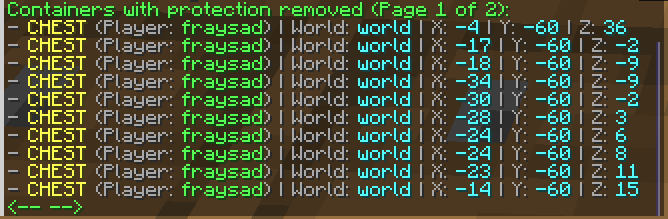
List of containers with protection removed (/frsp show)
Plugin Configuration
All plugin settings are located in the config.yml
file. You can configure:
- Protection radius.
- Required playtime to lift restrictions.
- Auto-save interval.
- Player messages.
- Types of protected containers.
# Number of blocks in each direction from the spawn point (/setworldspawn) within which protection is active
protection-radius: 200
# Time required to play to remove restrictions (default 120 minutes = 2 hours)
required-play-time: 120
# Auto-save interval for plugin data in minutes (default 120 minutes = 2 hours)
auto-save-interval: 120


# Protection settings for each container type
protected-containers:
  CHEST: true
  TRAPPED_CHEST: true
  BARREL: true
  SHULKER_BOX: true
  BLACK_SHULKER_BOX: true
  BLUE_SHULKER_BOX: true
  BROWN_SHULKER_BOX: true
  CYAN_SHULKER_BOX: true
  GRAY_SHULKER_BOX: true
  GREEN_SHULKER_BOX: true
  LIGHT_BLUE_SHULKER_BOX: true
  LIGHT_GRAY_SHULKER_BOX: true
  LIME_SHULKER_BOX: true
  MAGENTA_SHULKER_BOX: true
  ORANGE_SHULKER_BOX: true
  PINK_SHULKER_BOX: true
  PURPLE_SHULKER_BOX: true
  RED_SHULKER_BOX: true
  WHITE_SHULKER_BOX: true
  YELLOW_SHULKER_BOX: true
  HOPPER: true
  DROPPER: true
  DISPENSER: true
  FURNACE: true
  BLAST_FURNACE: true
  SMOKER: true


# General setting for all blocks (except containers)
protect-all-blocks: true

# And lots of messages settings
Commands and Permissions
| Commands | Permissions | Description |
|---|---|---|
| /frsp reload | frsp.reload | Reloads the plugin configuration |
| /frsp stick | frsp.getstick | Gives a special stick for removing container protection |
| - | frsp.usestick | Allows the use of the special stick |
| /frsp show | frsp.show | Displays a list of containers with removed protection |
| - | frsp.bypass | Allows players to bypass plugin restrictions. |
| - | frsp.notify | Allows players to receive interaction restriction notifications. |
Installation
- Download the plugin from this page.
- Place the
.jarfile in your server's plugins folder. - Restart the server.
- Configure the plugin via the
config.ymlfile.
Links
- Discord: link
- Mail: frsdevmc@gmail.com
