Command Visibility Plugin
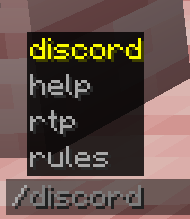
Shows / Hide Commands from Tab Auto Completion
518
4
CommandVisibilityPlugin
Description:
CommandVisibilityPlugin is a simple yet powerful plugin for Minecraft servers that allows you to control which commands players can see in their /tab and /help lists. This plugin helps server administrators manage visibility of commands, ensuring players only see commands they have permission to use. Additionally, the plugin includes an option to bypass visibility restrictions for administrators or trusted players using specific permissions.
Its a free option for Plugin Hide Pro
Features:
-
Control Command Visibility:
- The plugin allows server administrators to define which commands players can see in
/tab(tab-completion) and/helpcommands. - You can specify commands to show for specific players or groups, based on their permissions.
- The plugin allows server administrators to define which commands players can see in
-
Bypass Option for Admins:
- Players with the
commandvisibility.bypasspermission will see all commands (ignoring any visibility restrictions).
- Players with the
-
Configurable via
config.yml:- You can easily customize the list of commands that should be shown using the
shown-commandssection inconfig.yml. - Add or remove commands from the list as needed.
- You can easily customize the list of commands that should be shown using the
-
Reload Command:
- The plugin includes a
/commandvisibility reloadcommand, which reloads the configuration without needing to restart the server. - Only players with the
commandvisibility.reloadpermission can execute this command to refresh the plugin’s settings.
- The plugin includes a
-
Permissions Integration:
- Fully compatible with LuckPerms for managing permissions.
- You can assign permissions like
commandvisibility.reloadandcommandvisibility.bypassto control command visibility and reload access.
Installation:
-
Download the Plugin:
- Download the
CommandVisibilityPlugin.jarfile.
- Download the
-
Add to Plugins Folder:
- Place the downloaded
CommandVisibilityPlugin.jarfile into theplugins/folder of your Minecraft server.
- Place the downloaded
-
Restart the Server:
- Restart your Minecraft server to load the plugin. This will automatically generate a
config.ymlfile in the plugin's folder.
- Restart your Minecraft server to load the plugin. This will automatically generate a
-
Edit the Configuration:
- Open
plugins/CommandVisibilityPlugin/config.yml. - Add or remove commands from the
shown-commandslist that you want players to see.
Example:
shown-commands: - rtp - discord - help - rules - msg - Open
Permissions:
commandvisibility.bypass:- Purpose: Grants players the ability to see all commands, bypassing the visibility restrictions.
- Usage: Assign this permission to trusted players or admins who should always see all commands, regardless of the configuration.
- Example:
/lp user <username> permission set commandvisibility.bypass true
Совместимость
Ссылки
Создатели

Детали
Лицензия:CC-BY-NC-4.0
Опубликован:1 год назад
Обновлён:1 год назад