
AevorinReports
A Powerful and Easy-to-Use Player Reporting System for Your Minecraft Server

Official Documentation
Overview
AevorinReports is a modern, robust reporting system designed for Minecraft servers that require structured moderation workflows. It enables players to submit reports easily while providing staff with powerful tools to review, manage, and resolve reports efficiently. The plugin is optimized for performance, supports multiple GUI styles, integrates with Discord, and scales seamlessly across single servers and networks.
Region Restriction
AevorinReports is designed to be used globally; however, please note that the plugin is restricted and will not function on servers located within Israel. This is enforced via automated IP/timezone verification.
#FreePalestine
1. Core Features
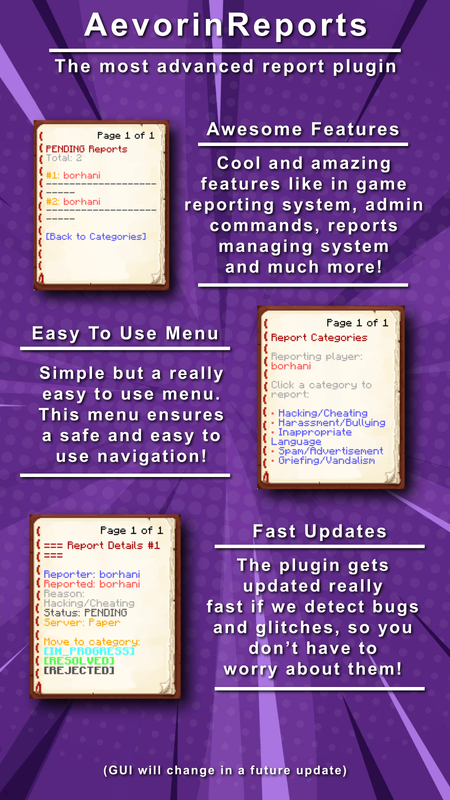
- Interactive Admin GUI – Review, manage, and update reports using a clean, click-based interface
- Player Report History – Players can view their submitted reports and statuses using
/reports - Multiple GUI Types – Supports both Book GUI and Container (Chest) GUI styles
- Real-Time Staff Alerts – Instantly notify staff members when a report is submitted
- Clear Status Workflow – Reports transition through Pending → Resolved / Rejected
- Custom Report Reasons – Allows players to provide custom reasons via chat input
- MiniMessage Support – Fully customizable messages with gradients, hover events, and formatting
- Discord Integration – Dedicated Discord bot with embeds and real-time notifications
- Database Support – SQLite (local) and MySQL (network-wide synchronization)
- Optimized Performance – Asynchronous processing and intelligent caching
- Full Localization Support – Built-in multi-language system with support for custom language packs
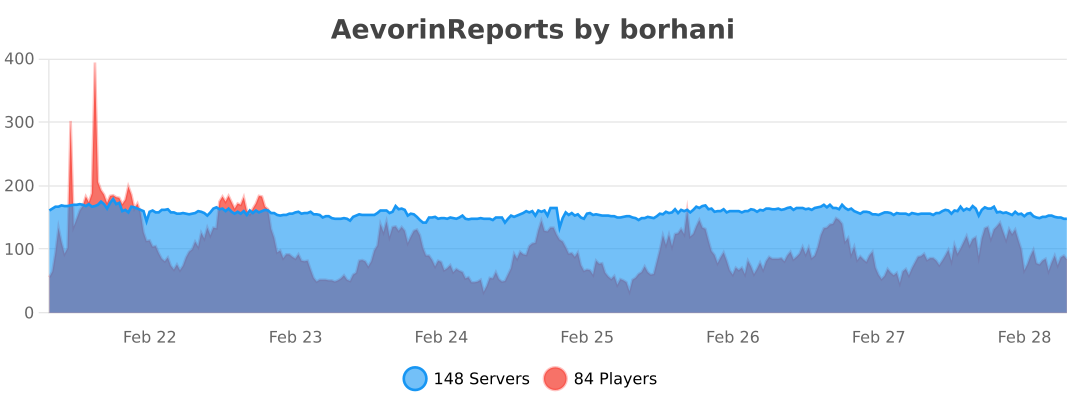
- bStats & FastStats Integration – Anonymous usage statistics and advanced telemetry for development insights
2. Commands
2.1 Player Commands
| Command | Description | Permission |
|---|---|---|
/report <player> [reason] | Submit a report against a player | aevorinreports.report |
/reports | View your submitted reports and their status | aevorinreports.report |
Notes:
- If no reason is provided with
/report, a GUI will open - Custom reasons can be entered via chat
2.2 Staff Commands
| Command | Description | Permission |
|---|---|---|
/reports | Open the Admin Report Management GUI | aevorinreports.manage |
/viewreport <id> | View detailed report information | aevorinreports.manage |
/setreportstatus <id> to <status> | Update report status | aevorinreports.manage |
/ar reload | Reload the plugin configuration | aevorinreports.reload |
2.3 Discord Bot Commands
| Command | Description |
|---|---|
/reports | List all active pending reports |
/lookup <id> | View full details of a specific report |
/resolve <id> | Mark a report as Resolved |
/reject <id> | Mark a report as Rejected |
/pending <id> | Mark a report as Pending |
/help | View the bot help menu |
3. Permissions
3.1 Basic Permissions
| Permission | Description | Default |
|---|---|---|
aevorinreports.report | Allows players to submit reports | true |
aevorinreports.manage | Allows staff to manage reports and access Admin GUI | op |
aevorinreports.notify | Receive notifications when a report is submitted | op |
aevorinreports.reload | Reload the configuration | op |
3.2 Wildcard Permissions
| Permission | Description |
|---|---|
aevorinreports.* | Grants all AevorinReports permissions |
4. Report Workflow
- A player submits a report using
/report - Staff members receive instant notifications
- Report is marked as Pending
- Staff review the report via the Admin GUI
- Report is marked as Resolved or Rejected
All actions are logged and synchronized across servers when using MySQL.
5. Configuration (config.yml)
This section documents every available option in config.yml, explaining its purpose and recommended usage.
Config Version System
# Please Do not change the config version
config-version: 4
The config-version field is used by AevorinReports to automatically manage and migrate your configuration when the plugin is updated to a newer version that requires changes to config.yml.
How It Works
- When the plugin loads, it reads the
config-versionvalue from your existingconfig.yml. - It compares that value against the version bundled inside the current plugin
.jar. - If they match: No migration is needed. The plugin proceeds normally.
- If the bundled version is higher: The plugin automatically:
- Creates a backup of your existing file as
config.yml.old. - Migrates all your existing settings (server name, database credentials, Discord token, etc.) into the new structure.
- Writes a fresh
config.ymlwith all new required fields, preserving your data.
- Creates a backup of your existing file as
[!CAUTION] Never manually edit the
config-versionfield. Changing it will cause the plugin to skip or repeat migrations, which can corrupt your configuration. If you need to reset the config, simply deleteconfig.ymland restart the server.
[!TIP] Your old config is always safely backed up as
config.yml.oldbefore any migration runs. If something goes wrong, you can restore your settings from that file.
5.0 Language Settings
language: "en_US"
- Sets the active language file loaded from the
plugins/AevorinReports/lang/folder. - The value must match a
.ymlfilename inside that folder (without the extension). - Built-in languages (automatically extracted on first startup):
en_US– English (default)it_IT– Italiansk_SK– Slovak
- Custom language files: You can create your own
.ymlfile inside thelang/folder.- Custom files are never overwritten by plugin updates.
- Any keys missing in a custom file will automatically fall back to
en_USvalues, so the plugin will never break due to untranslated strings. - A console warning will list any missing keys to help you keep translations up to date.
5.1 Server Configuration
server-name: "survival"
-
server-name: Identifies the server in multi-server setups.
- Must be unique when multiple servers share the same database.
- Displayed in Discord embeds and network-wide logs.
5.2 Database Configuration
database:
  type: "file" # mysql or file
Database Types
- file: Uses local SQLite storage (recommended for single servers).
- mysql: Enables cross-server synchronization for networks.
MySQL Settings
mysql:
  host: "localhost"
  port: 3306
  database: "aevorin_reports"
  username: "root"
  password: "password"
- Used only when
typeis set tomysql. - All servers must share the same credentials for synchronization.
File Storage
file:
  path: "database/reports.db"
- Location of the SQLite database file.
Connection Pool (Advanced)
pool:
  minimum-idle: 5
  maximum-pool-size: 10
  connection-timeout: 30000
- Optimizes database performance.
- Recommended to leave defaults unless tuning is required.
5.3 Report Settings
reports:
  allow-self-reporting: false
- Prevents players from reporting themselves when disabled.
GUI Configuration
gui:
  type: "book" # book or container
- book: Classic book-style interface.
- container: Modern chest-style GUI.
Limits & Cooldowns
cooldown: 300
max-active-reports: 3
- cooldown: Time (seconds) between report submissions.
- max-active-reports: Maximum unresolved reports per player.
Custom Reasons
allow-custom-reasons: true
custom-reason-min-length: 10
custom-reason-max-length: 100
- Allows players to submit custom reasons via chat.
- Length limits prevent spam and abuse.
Report Categories
categories:
  - "Hacking/Cheating"
  - "Harassment/Bullying"
  - "Spam/Advertisement"
- Displayed in the report GUI.
- Categories are fully customizable.
5.4 Notification Settings
notifications:
  new-report: true
  status-change: true
  sound: "BLOCK_NOTE_BLOCK_PLING"
  prefix: "&8[&bAevorinReports&8]&r "
- new-report: Notify staff when a report is created.
- status-change: Notify staff when report status changes.
- sound: Sound played for staff alerts (empty string disables).
- prefix: Prefix used for all plugin messages.
5.5 Update Checker
update-checker:
  check-interval: 60
  notify-on-join: true
- Automatically checks for new plugin versions.
- Notifies authorized players on join.
5.6 Debug Settings
debug:
  enabled: false
  log-queries: false
- enabled: Enables detailed debug logging.
- log-queries: Logs database queries (not recommended for production).
5.7 Message Customization
messages:
  report-created: "&aYour report has been submitted successfully!"
- Fully customizable messages.
- Supports color codes (
&) and placeholders. - MiniMessage is supported where applicable.
5.8 Discord Integration
discord:
  enabled: false
Network Mode (Multi-Server)
network-mode:
  enabled: false # set to true on ONE server only in a network
  poll-interval: 10 # how often to sync reports from the database (seconds)
- enabled: If
true, this server will poll the database for reports from all servers. - poll-interval: The frequency of database checks. Recommended: 5-10.
Core Settings
bot-token: "YOUR_BOT_TOKEN_HERE"
channel-id: "YOUR_CHANNEL_ID_HERE"
log-channel-id: "YOUR_LOG_CHANNEL_ID_HERE"
- Sends reports and status updates directly to Discord.
Staff Permissions
staff-role-id: ""
- Optional role restriction for Discord moderation commands.
Bot Appearance
bot-settings:
  status: "ONLINE"
  activity:
    type: "WATCHING"
    message: "Reports | %online_players% players online"
Discord Notifications
notifications:
  title: "New Report (#%id%)"
  color: "#ff5555"
  footer: "AevorinReports • %date%"
- Fully customizable embed formatting.
6. Discord Features
- Report submission notifications
- Status update alerts
- Embedded messages with player avatars
- Server and report metadata displayed
7. GUI Preview
8. Technical Features
- Async database operations
- Thread-safe report handling
- Efficient caching system
- Modular and extendable architecture
- Safe reload handling
9. Dependencies
Optional
- MySQL – Network-wide report synchronization
- Discord API (JDA) – Discord bot integration
Notes:
- These optional dependencies are built in the plugin itself and can be enabled from config.yml
10. Installation Guide
- Download AevorinReports from the Modrinth page
- Place the
.jarfile into the/plugins/directory - Restart the server to generate configuration files
- Configure
config.ymland database settings - (Optional) Configure Discord integration
- Reload or restart the server
11. Analytics & Telemetry
bStats
FastStats
AevorinReports also uses FastStats for advanced, real-time plugin analytics. The following custom metrics are tracked to help guide future development:
| Metric | Description |
|---|---|
pending_reports | Number of currently pending reports on the server |
total_reports | Total reports ever created on the server |
gui_provider | Which GUI type the server uses (book or container) |
db_backend | Which database backend is in use (file or mysql) |
configured_categories | How many report categories the server has set up |
discord_integration | Whether the Discord bot is enabled (true/false) |
All telemetry is anonymous — no player data, usernames, IPs, or personally identifiable information is ever collected.
12. License
AevorinReports is licensed under the MIT License.
You are free to use, modify, distribute, and sublicense this software, provided that the original copyright and license notice are included in all copies.
Credits
Developed by Aevorin Studios