AdvancedBanZ
AdvancedBanZ is a updated fork of the original AdvancedBan plugin by Leoko.
# Please note: This is a fork of the original AdvancedBan or AdvancedBanX plugin. Do not request support in the official AdvancedBan Discord; instead, seek help on the GitHub repository's issues page.
Description
AdvancedBanZ is a fork of AdvancedBanX, which itself is a modernized update of the original AdvancedBan plugin developed by Leoko. It is an all-in-one punishment system supporting warnings (warn), temporary warnings (tempwarn), mutes, temporary mutes (tempmute), bans, temporary bans (tempban), IP bans (ipban), and kicks. The plugin also provides a player history feature to view past punishment records.
The plugin supports configurable time and message templates, automatically calculating and increasing punishment durations based on specific reasons. AdvancedBanZ provides complete message files, allowing you to freely modify and translate all prompts, and includes a detailed main configuration file with numerous practical options.
Currently, AdvancedBanZ supports Bukkit (Spigot/Paper) and BungeeCord platforms, and supports both MySQL and local file storage for data persistence.
Installation Steps
- Download the plugin from Modrinth.
- Place the plugin into your
pluginsfolder (applicable for both Bukkit and BungeeCord). - Reload or restart your server.
- Use
/advancedbanto check if the plugin loaded successfully. - Configure as needed and start using it.
Optional Tip: If you encounter issues connecting to the database, try adjusting the MySQL version to 5.X.
Command Reference
View All Commands
Legend:
-
[Required] <Optional>:|means "or",-sindicates a silent punishment (does not notify others) -
/kick<-s> [Player] <Reason | @LayoutName>
Kick a player -
/ban /mute /warn /note <-s> [Player] <Reason | @LayoutName>
Ban / Mute / Warn a player, or add a note to them -
/banip <-s> [Player/IP] <Reason | @LayoutName>
Ban a player's IP (if a player name is entered, the cached IP is used) -
/tempban /tempmute /tempwarn <-s> [Player] [Xmo|Xd|Xh|Xm|Xs|#TimeLayout] <Reason | @LayoutName>
Issue a temporary punishment with a specified duration or auto-calculated duration based on a time layout -
/tempipban <-s> [Player/IP] [Xmo|Xd|Xh|Xm|Xs|#TimeLayout] <Reason | @LayoutName>
Temporarily ban a player's IP (Alias:/tipban) -
/change-reason [ID] [New Reason]
Modify the reason based on the punishment ID -
/change-reason [ban/mute] [Player] [New Reason]
Modify the reason for a player's current ban or mute -
/unban /unmute [Player]
Unban or unmute a player -
/unwarn /unnote [ID]
Remove a warning or note -
/unwarn /unnote clear [Player]
Remove all warnings or notes for a player -
/unpunish [ID]
Remove any type of punishment record -
/warns /notes <Player>
View your own or another player's list of warnings/notes -
/check [Player]
Get player status: UUID / IP / Country / Ban Status / Mute Status / Warning Count / Note Count -
/banlist <Page>
View all currently active punishments -
/history [Player] <Page>
View a player's historical punishment records (requires permissionab.history) -
/advancedban reload
Reload message files and some settings -
/advancedban help
Display all commands and their brief descriptions -
/systemprefs
Display system information helpful for configuration
Permission Nodes
All Permissions
ab.kick.use - /kick
ab.kick.exempt - Exempt from being kicked
ab.notify.kick - Receive kick notifications

ab.ban.perma - /ban
ab.ban.temp - /tempban
ab.ban.undo - /unban
ab.ban.exempt - Exempt from being banned
ab.notify.ban - Receive ban notifications
ab.undoNotify.ban - Receive unban notifications

ab.notify.tempban - Receive temporary ban notifications

ab.ipban.perma - /ipban
ab.ipban.temp - /tempipban
ab.notify.ipban - Receive IP ban notifications

ab.tempipban.exempt - Exempt from temporary IP bans
ab.notify.tempipban - Receive temporary IP ban notifications

ab.mute.perma - /mute
ab.mute.temp - /tempmute
ab.mute.undo - /unmute
ab.mute.exempt - Exempt from being muted
ab.notify.mute - Receive mute notifications
ab.undoNotify.mute - Receive unmute notifications

ab.notify.tempmute - Receive temporary mute notifications

ab.warn.perma - /warn
ab.warn.temp - /tempwarn
ab.warn.undo - /unwarn
ab.warn.exempt - Exempt from being warned
ab.notify.warn - Receive warning notifications
ab.undoNotify.warn - Receive unwarn notifications

ab.notify.tempwarn - Receive temporary warning notifications

ab.note.use - /note
ab.note.undo - /unnote
ab.note.exempt - Exempt from having notes added
ab.notify.note - Receive note notifications
ab.undoNotify.note - Receive note removal notifications

ab.all.undo - /unpunish

ab.warns.own - /warns (view self)
ab.warns.other - /warns PLAYER (view others)

ab.notes.own - /notes (view self)
ab.notes.other - /notes PLAYER (view others)

ab.check - /check
ab.check.ip - Also display IP

ab.changeReason - /change-reason
ab.banlist - /banlist
ab.history - /history
ab.reload - /advancedban reload
ab.help - /advancedban help
ab.systemprefs - /systemprefs
Limiting Punishment Durations
By default, users can punish others indefinitely as long they have the corresponding permission. You can set maximum punishment durations via ab.tempban/tempmute/tempwarn.dur.X.
In the configuration file, there is a section named TempPerms that can be used to define the maximum punishment duration for different IDs. For example:
1: 3600
This means a user with the permission ab.tempban.dur.1 can only ban for a maximum of 3600 seconds (i.e., 1 hour). The unit is seconds. If a user has multiple such permissions, the one with the higher number takes precedence. See config.yml for more details.
Hierarchical Exemption Permissions
For servers with large teams and complex hierarchies, you may need finer control over who can punish whom.
To do this, you can assign exemption level permissions to users in the following format:
ab.TYPE.exempt.X
Where:
TYPEcan be: ban, tempban, ipban, tempipban, warn, tempwarn, kick, mute, tempmuteXis an integer from 1 to 10 (10 is the highest privilege)
If X is not specified (i.e., just ab.TYPE.exempt), it is equivalent to ab.TYPE.exempt.11, meaning complete immunity.
Note: Exemption permissions only take effect when the target player is online (unless using LuckPerms!)
Users of the same level cannot punish each other.
Examples:
- A user with
ab.ban.exemptcannot be banned by anyone. - A user with
ab.ban.exempt.4cannot be banned by a user withab.ban.exempt.3, but can be banned by a user withab.ban.exempt.5.
Additional Notes
If you are using this plugin on BungeeCord, you need to define permissions in BungeeCord's config.yml or manage them via a dedicated BungeeCord permissions plugin.
The BungeeCord permission system does not support the * wildcard, so having ab.* does not grant access to all commands. To simplify configuration, AdvancedBanZ provides a setting called EnableAllPermissionNodes. When enabled, you can use .all instead of .*. For example, ab.all grants permission for all AdvancedBanZ commands. (Note: This feature does not work with negative permissions, e.g., -ab.all is invalid.)
Configuration File Explanation
config.yml
The configuration file should be easy to understand, with detailed comments for each option.
config.yml
# AdvancedBan v4 - Original author Leoko, updated and maintained by 2vY (hlpdev) and Author87668
# Each setting has a brief description; please read carefully before modifying.
# For more information, visit: https://www.spigotmc.org/resources/advancedban.8695/

# Set to false to save all ban records in a local SQLite database
UseMySQL: false

MySQL:
  IP: localhost
  DB-Name: database-name
  Username: admin
  Password: superSecret
  Port: 3306
  Properties: 'verifyServerCertificate=false&useSSL=false&useUnicode=true&characterEncoding=utf8'

# Whether to show only brief logs on plugin enable/disable
DetailedEnableMessage: true
DetailedDisableMessage: true

# Whether to prevent players from joining the server when a database connection error occurs (e.g., MySQL downtime)
LockdownOnError: true

# Default punishment reason (used when none is specified)
# Supports standard color codes or MiniMessage format (https://docs.advntr.dev/minimessage/format.html)
DefaultReason: "No reason provided."

# If the server time differs from your time zone, adjust the offset here
# Example: Server time 16:43, your time 13:43, then set to -3
# You can view server time via /systemPrefs
TimeDiff: 0

# List of commands that muted players cannot use (to prevent bypassing)
MuteCommands:
- 'me'
- 'say'
- 'action'
- 'eaction'
- 'describe'
- 'edescribe'
- 'eme'
- 'w'
- 'm'
- 'pm'
- 'whisper'
- 'ewhisper'
- 'emsg'
- 'msg'
- 'etell'
- 'tell'
- 'er'
- 'r'
- 'reply'
- 'ereply'
- 'ac'
- 'eac'
- 'amsg'
- 'eamsg'
- 'ehelpop'
- 'p msg'

# These players cannot be punished in any way (effective even when offline)
# Recommended to use with the Vault plugin to ensure offline exemptions work correctly
ExemptPlayers:
- 'Leoko'
- 'md5'
- 'dutchy1001'
- 'ItzSomebody'

# Date format for the %DATE% variable
DateFormat: "MM/dd/yyyy HH:mm"

# Whether to enable the .all permission node (for permission systems that do not support *, such as BungeeCord)
# When enabled, ab.all can be used instead of ab.*
# Note: Negative permissions (e.g., -ab.all) are invalid
EnableAllPermissionNodes: false

# UUID Fetcher Settings
UUID-Fetcher:
  # Dynamic mode automatically selects the best fetching method; recommended to keep enabled
  Dynamic: true
  Enabled: true
  Intern: false
  REST-API:
    URL: "https://api.mojang.com/users/profiles/minecraft/%NAME%?at=%TIMESTAMP%"
    Key: "id"
  BackUp-API:
    URL: "https://api.minetools.eu/uuid/%NAME%"
    Key: "id"

# Actions triggered when warnings reach specified counts
# Supports variables: %PLAYER% %REASON% %COUNT%
# Supports MiniMessage format
WarnActions:
  3: "kick %PLAYER% &c&oYou have received your 3rd warning!"
  4: "tempban %PLAYER% 30m &c&oYou have received your 4th warning!"
  5: "tempban %PLAYER% 5h &c&oYou have received your 5th warning!"
  6: "tempban %PLAYER% 7d &c&oYou have received your 6th warning!"
  7: "tempban %PLAYER% 1mo &c&oYou have received your %COUNT%th warning!"
  10: "ban %PLAYER% &c&oYou have received your 10th warning!"

# Maximum punishment duration permission mapping (unit: seconds)
TempPerms:
  1: 600    # 10 minutes
  2: 3600   # 1 hour
  3: 43200  # 12 hours

# Whether to enable debug mode (outputs more logs, useful for troubleshooting)
Debug: false

# Number of days to retain plugin logs (located in plugins/AdvancedBan/logs)
Log Purge Days: 10

# Whether to disable the plugin prefix in all messages
Disable Prefix: false

# Whether to register commands in a friendlier way (Bukkit only)
# Disabled by default to allow overriding /ban and other commands from other plugins
Friendly Register Commands: false
messages.yml
Contains all user-facing prompt text, supporting standard color codes and MiniMessage format.
messages.yml (excerpt of key structure, full content omitted)
File structure includes:
- General
- Ban / Ipban / Tempban / Tempipban
- Mute / Tempmute
- Warn / Tempwarn / Note
- Kick
- UnBan / UnMute / UnWarn / UnNote / UnPunish
- Banlist / History / Warns / Notes
- Check
All messages are customizable and support variables such as %NAME%, %OPERATOR%, %REASON%, %DURATION%, etc.
layouts.yml
Used to define preset message templates and time increment templates.
layouts.yml
# Message Templates: Can be called via @TemplateName
Message:
  ExampleLayout:
   - '%PREFIX% &7Banned for cheating'
    - '&c&oExecuted by %OPERATOR%'
    - '&7'
    - "&cDetected use of"
    - "&cillegal client, please stop immediately!"
    - "&cUnban time &8» &7%DURATION%"
    - '&7'
    - '&8Please apply for unban via TS or Forum'
    - "&eTS Address &8» &c&nComing Soon"
    - "&eForum Address &8» &c&nComing Soon"

# Time Templates: Can be called via #TemplateName, duration increases automatically with each punishment
Time:
  ExampleLayout:
   - '30m'   # 1st time
    - '2h'   # 2nd time
    - '1d'   # 3rd time
    - '1w'
    - '1mo'
    - '2mo'
    - '4mo'
    - 'perma' # Permanent
Usage Examples:
/tempban PlayerA #ExampleLayout Cheating/warn PlayerB @ExampleLayout
Features
- All-in-one system for bans, kicks, mutes, and warnings
- High-performance performance
- Supports both BungeeCord and Bukkit/Spigot/Paper
- Player punishment history
- Advanced UUID support (built-in/external fetchers + backup API)
- Supports MySQL or local SQLite storage
- Fully customizable messages and behaviors
- Multi-line ban/kick messages
- Preset reason templates
- Automatic punishment duration escalation (1st time 1 hour, 2nd time 6 hours...)
- Custom time zone offset
- Automatic warning linkage actions (e.g., auto-kick after 3 warnings)
/checkcommand to query UUID, IP, country, ban/mute/warning status- Full support for MiniMessage formatting syntax
Technical Support
If you encounter issues, please check the console error logs first. If the problem persists, please submit an issue on our GitHub Issues page.
Statistics
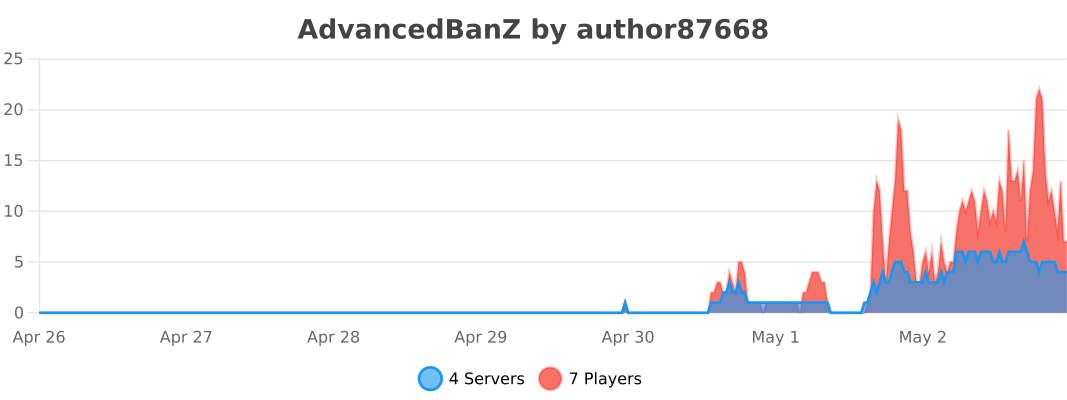
This plugin uses bStats to anonymously collect server information (such as player count, server version, etc.).
Bukkit
BungeeCord
API Development
When developing plugin extensions, ensure that the AdvancedBanZ main plugin is installed on the server.
Maven Dependency
<repositories>
    ...
    <repository>
        <id>hnt8</id>
        <url>https://java.hnt8.net</url>
    </repository>
    ...
</repositories>

<dependencies>
    ...
    <dependency>
        <groupId>net.hnt8.advancedban</groupId>
        <artifactId>AdvancedBanZ</artifactId>
        <version>3.0.6</version>
        <scope>provided</scope>
    </dependency>
    ...
</dependencies>
